At the weekend I reached a milestone in a project that has taken me through at least two cognitive event horizons in how I now see the familiar compute landscape which I felt might be interesting to share. It has also left me convinced of something else; AI is now here for the masses. So heads up to corporate IT and Cyber, remember the early days of the PC, when enterprises did not so much lead adoption as eventually surrender to it because their employees were already using computers at home and demanding the same capability at work? I think we may be approaching that moment again, only this time it is not the PC arriving through the corporate gates, it will be personal agentic AI.
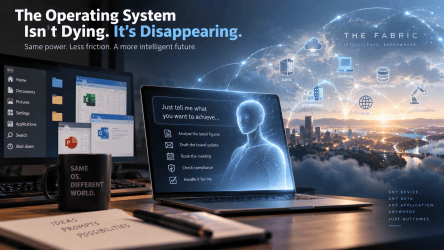
Let me set the scene. For nearly half a century, the operating system has sat between humans (the wetware) and computers (hardware) because humans need a comprehensible way of controlling extraordinarily complicated machines through applications run on operating systems (the software). It’s not that I think Windows, macOS/OSX and Linux are going anywhere, quite the opposite. They are likely to become more important than ever, however I believe that their visibility could collapse. The irony is that Microsoft’s successful transformation of Windows into an agent native OS could ultimately make Windows itself less important to the user.
Why do I think this? Windows, files, folders, menus, applications, processes, settings, peripherals are not fundamental properties of computing, they are abstractions we invented because people needed a manageable way to tell machines what to do. AI agents have a rather different problem.
An AI agent does not particularly care whether there is a desktop, start menu, dock, finder or taskbar. It does not need to double click an icon, locate a spreadsheet or navigate twelve menus to change a configuration. It needs identity, permissions, context, memory, APIs, execution environments, compute and connectivity. That is likely to profoundly change what an operating system actually means.
Let me start by providing a high level perspective of my journey. It started as a simple challenge to see what AI model(s) I could get running locally on my laptop and what that could mean in terms of functional augmentation. OK I confess not your average laptop spec (yet), I am running a Dell Pro Max 16 Premium with an Ultra 7 CPU, 64GB RAM and critically a dedicated 8GB of Graphics Processing RAM in the form of an Nvidia RTX PRO 2000 Blackwell Graphics Processing Unit (GPU). That having been said 8GB of GPU does not open pandora’s box, with Frontier Large Language Models (LLM’s) coming in at 400GB + you start to get the gist of what GPU memory space you need to run such generational models. That having been said thanks to the team at Hugginface you will find a ready source of available models (both guardrailed and of interest, uncensored) that I can confirm you can get running comfortably on a laptop of similar spec.
For the more techie out there, the foundational setup in summary was initially:
- Windows 11 Enterprise with virtualisation enabled.
- WSL v2 (Windows Subsystem for Linux, with UBUNTU installed)
- x2 1TB Nvram SSD’s
- Ollama installed as the model engine (Ollama supports NVIDIA GPU acceleration under Windows)
- Docker Windows Desktop with backend WSL2 environment.
- Open WebUI – User interface, ChatGPT style, for model chats and projects etc.
- Model manifest(s) pulled form Hugginface.
Core to the principles I wanted to explore was ease of config replication and separation/securityprivacy of user data. This meant installing models etc. into a dedicated \localAI directory with the following sub folders for ease of data management and resilience:
- Models
- Documents
- OpenWebUI
- Backups
- Exports
- Cyber (read on for the next phase…)
Critical to the 8GB GPU limit on my laptop was the use of Quantised and Mixture of Experts (MoE) adapted models that allowed me to run larger models that would not natively be able to run in my 8GB GPU memory without offloading into systems RAM and grinding things to a halt. Think of this as compression for AI models, allowing you to get more data into less storage space, in brief:
- Quantisation = compressing the brain. For example at the weight level, Q4 can reduce storage towards a quarter of FP16, although real world memory savings are lower once runtime overheads are included.
- MoE = having a team of specialists to split up and fast track responses, these exist in memory but only a few specialists work on each ‘word’.
and yes you can combine them … Quantised + MoE = a compressed team of specialists, only a few of whom work at once.
The result being I now have a local AI environment that does not require any external access, saves my own data locally (privacy, yeh), no subscription charges and interestingly gives me freedom to run uncensored models.
With a few further tweaks that included voice activation and playback for hands off interaction and a backend that maintains 3 distinct update channels:
- Models – Detect new Qwen/Llama/Mistral/etc. releases, but does not automatically replace the production model. So I can download and benchmark them first.
- Software – Automatically track Ollama, Open WebUI, (future potential for vLLM), ComfyUI (I added AI image creation to Phase 1 above), embedding models and container updates, with controlled deployment and rollback.
- Knowledge – Continuously refresh NVD/CVE, CISA KEV, MITRE ATT&CK, OWASP, NIST and selected vendor advisories.
Ah … the last one ‘Knowledge’ is me getting a bit ahead of myself as it relates to ‘Phase 2’ of my journey.
Having exceeded expectations on the baseline AI capability I challenged myself to elevate this into a fully ‘Agentic’ system. Phase 2 was concieved with a target use case being my own virtual penetration tester and mitigation consultant. Why? I have largely been at the mercy of my technically adept colleagues to handle the real deep plumbing activities when it comes to Cyber config assessments, could I now use AI to augment my own experience with a technical layer on demand?
48 hrs and not a small bit of frustration later as I struggled with Python and Powershell scripts (with significant help, thank you Claude and ChatGPT), the answer is a tentative yes. I now have a ‘Human in the Loop’ safety valved agentic or more realistically a controlled, semi-agentic, not fully autonomous agentic AI environment in which the AI proposes an active scan, creates a pending job and execution only occurs after explicit approval. This baseline AI environment Phase 2 transformation comprised augmenting an installation of Kali Linux (leading penetration testing toolkit environment) with my AI stack. For the techies this can be summarised as follows:
- Install Hyper-V with a Kali Linux VM on a dedicated virtual network, separate from my normal LAN.
- Deployed controlled security tooling. Initially just Nmap inside Kali, (future plans to add Nuclei, ZAP and other assessment tools).
- Added a secure gateway using the FastAPI/OpenAPI service between the model and Kali; no general shell access is exposed. A critical safety valve to avoid the rather obvious unintended consequence of giving a probabilistic model unrestricted access to a penetration testing toolkit.
- Restrict Kali access. Through a dedicated SSH account, SSH key authentication and forced command wrappers that only allow predefined scan profiles.
- Deploy local Retrieval Augmented Generation (RAG) vector search, Qdrant plus a local embedding model such as nomic-embed-text enables the AI to retrieve relevant cyber intelligence by ingesting OWASP WSTG/ASVS, MITRE ATT&CK, CWE, NIST and vendor security guidance and reports. This establishes a local vulnerability database, incrementally synchronise external NVD/CVE data into a structured local database for CVE, CVSS, CWE and product/version correlation.
- Connect into Open WebUI to expose narrowly defined OpenAPI/MCP (Model Context Protocol) functions such as propose_nmap_scan, lookup_cve and search_cyber_knowledge.
- Created the agentic sequence loop.
The key principle here was to keep the AI autonomy bounded so that read only analysis can be automatic and active scanning requiring human approval with all higher risk actions requiring additional separate elevated control by a human … for now.
There are still a few bugs to sort out to get this fully hooked up but I can see the light at the end of the tunnel that could have me prompting or simply asking my laptop to pen test an environment, play back to me what it has found with recommended remediation steps I can review before taking any further action.
As you are probably surmising, this already has an emergent Phase 3. This I see could leverage the same ‘harness’ (orchestration technology/architecture) to tie in a compliance RAG (local knowledge repo) to take the technical assessment from Phase 2 into a compliance analysis phase. The objective being to produce an action plan comprising control set prioritisation maps reflecting a predetermined set of regulations (NIST, ISO xyz, DORA, CADA etc) and or frameworks and extend into using a more diverse range of pentesting tools such as EntraFalcon and n8n Security Workflow POCs.
You can see where this is likely to go further … a possible Phase 4 could be the full automation of this ‘read-only, analysis + recommend’ sequence. The potential for the rendering of a scorecard to report on remediation and continuous cyber hygiene status of the target system or environment; complete with a PDF or word format ready report in consulting format for both Executive and Operational teams (if they still feel the need for reminiscence), how long before the report phase becomes redundant and it simply becomes a real time dashboard and API onto a secure machine readable RAG for retained and automated institutional intelligence security and persistence.
When I reflected on this, I became aware that somewhere during this experiment I had stopped thinking about the individual applications altogether. Ollama, Docker, Linux, Windows, Kali, Qdrant, Python/Powershell, APIs and the model were becoming implementation details. What I was actually constructing was a capability. What I mean is I expressed an intent; the system determined which combination of intelligence, knowledge, tools and compute was required to fulfil it and that was the event horizon my mind broke through. Once that becomes the normal way humans interact with computers, the application and eventually much of the operating system interface itself begins to disappear from view.
This is where I close the loop and emerge from the plumbing of the ‘how’ back onto the theme at the top of this blog. The visibility collapse of the desktop OS and evolution beyond recognition of applications as we know them, which I suspect is coming into sight. This had me recalling an earlier piece I wrote The Executive Mindset Challenge in the Age of Machine Speed Intelligence,
I now find myself reflecting on how I work today through new eyes. I might open Outlook, find an email, download an attachment, open Excel, manipulate some numbers, create a PowerPoint presentation and send it to somebody. Tomorrow I will simply say ‘Update the board presentation with August’s figures, explain the material variances and send it to the executive team and provide me with a breakdown of the likely challenges they will raise to produce an FAQ that can accompany it and fully cross referenced to source material.’
Behind that instruction, your OS of choice might still be doing enormous amounts of work. Excel may calculate the numbers, PowerPoint may construct the presentation, Outlook may deliver it, identity systems may authenticate and restrict the agent and security controls may constrain its actions and data access but you will rarely actually visit any of them anymore, you will delegate to an agent. That is the important distinction. The operating system has not died, it will disappear from our workflow. The same may increasingly happen to applications themselves, whereby software evolves from somewhere humans go, into capabilities machines/agents invoke.
This changes the significance of the desktop and opens up pandoras box of machine agency that organisations need to prepare for TODAY. For decades the hierarchy was broadly Human booted Operating System, engaged application and latterly we can extend that to goes online (the Network) and consumes services (The Cloud). Agentic computing as I have proven rearranges it, Humans will instruct (prompt or voice), an Agent will spin up The Fabric (resources on demand only) and harness deemed appropriate Capability(s). That capability could reside on a laptop or another local machine, corporate platform or hyperscaler/NeoCloud and sooner than any of you will be imagining it will be involving autonomous IoT device(s); and at that point I will leave that thread for a later missive.
The end user will increasingly neither know nor care. Within The Fabric which I expect to emerge as I wrote about at the weekend (The Cloud Won, Now It’s Just Infrastructure … Welcome to ‘The Fabric’), workloads can increasingly be placed according to permissions, latency, sovereignty, cost, available compute, security and context. Furthermore the on-demand pricing being negotiated at machine speed in nanoseconds through machine only marketplaces invisible to humans, driving down price and increasing utility. That does not make the operating system obsolete. In many respects it makes it more important. Windows, macOS/OSX and Linux become the trusted end user execution substrates of The Fabric, managing hardware, isolating processes, authenticating agents, enforcing policy and protecting resources all of which will be functions increasingly performed below the waterline and in the clouds.
There is an interesting historical symmetry here. Remember the command line? That did not disappear when the graphic user interface (GUI) arrived; the GUI simply hid much of the complexity from ordinary users. The agentic interface may now do the same thing to the GUI. The Start menu, desktop, application window and file browser may eventually look like transitional interfaces from an era when humans still needed to know where information lived, which application could manipulate it and which machine would execute the instruction. Future generations may regard that relationship with the same nostalgia we reserve for a Sinclair ZX Spectrum emulator.
After all, why should a human need to know which application performs a task, where the data resides or even which machine executes it? Tell the machine what you want to achieve and let The Fabric determine how. That is why I do not think the coming transformation represents the demise of Windows, macOS/OSX or Linux. Quite the opposite. They are likely to become more important as the trusted execution substrates underneath an increasingly agentic world. We will simply not spend nearly as much time interacting with them as we do today.
The command line was obscured by the GUI. The GUI may now be obscured by the agent. Applications become capabilities, computers become execution nodes and the boundaries between device, edge and cloud begin to blur. Yes, the operating system survives, however the need to see it does not and another piece of the old computing landscape disappears into The Fabric.
If you have got this far, thank you for your persistence, this turned out to be a bit longer than originally anticipated so I genuinely hope you have found some inspiration and foresight. Please reach out if you want to explore a similar experiment yourself.
Leave a Reply